Web
Ingress is provided over Nginx Web Proxy.
Remote web clients connect to an external Nginx installed on the portal Linode instance. This applies a couple key headers and then routes all web traffic to the internal nginx through an SSH tunnel connected from the lab to the portal instance. In lab, the Nginx configuration, in combination with the Keycloak Identity Provider, work to secure the lab's HTTP in several ways including geofencing, brute force detection as well as enforcing password complexity and MFA.
anatomy
Below are examples for different kinds of traffic flows which describe the lab's web ingress model.
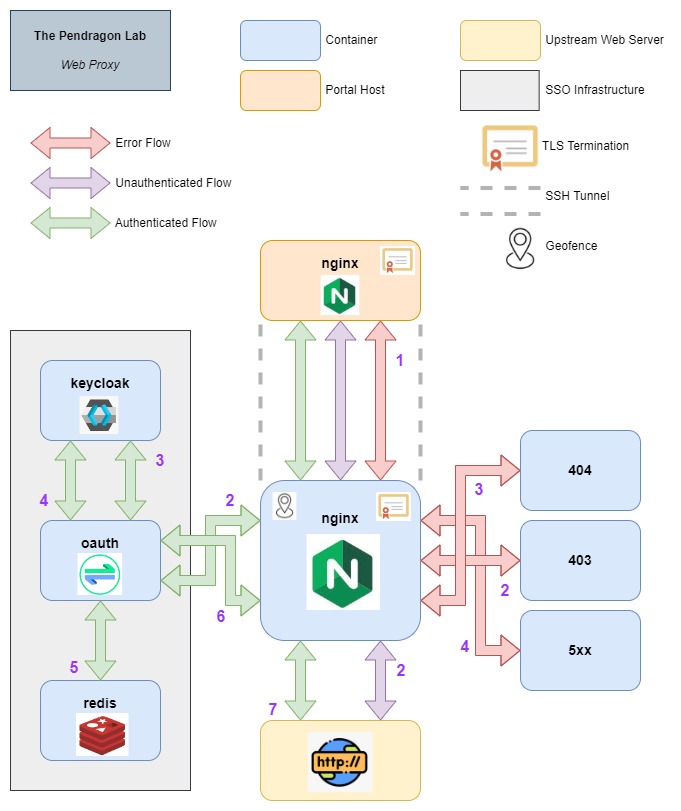
User request starts in the Nginx service on the
portalhost, top middle.
-
( 1 ) External to Internal
nginx- Client request comes into an internal Nginx through an external Nginx service installed on theportalLinode instance via SSH tunnel. TLS terminates in both instances. The external Nginx applies theX-Real-IPheader to preserve source IP address and appliesX-Portalheader to route external ingresses separately from internal, once in the lab. -
Error Flow
-
( 2 ) 403 - Client IP address is outside the supported geofence; client is redirected to a static 403 page.
-
( 3 ) 404 - Client request has no ingress configuration or was not found; client is redirected to a static 404 page.
-
( 4 ) 5xx - Client request has errored; client is redirected to a static 5xx page.
-
-
Unauthenticated Flow
- ( 2 ) Upstream Server - Request is allowed through to the proxied upstream server as the ingress has no other requirements.
-
Authenticated Flow
-
( 2 ) Check Auth - Ingress has an
auth_requestdirective; client is redirected to Oauth2-Proxy container if the_oauth2-proxycookie is either missing or stores an invalid or expired token. -
( 3 ) Redirect to
keycloaklogin - Missing required token value, the Oauth2-Proxy container redirects the request to the Keycloak login page where user is prompted for MFA. -
( 4 ) Return with Tokens - Once authenticated, Keycloak returns with an access token configured to expire after a determined amount of minutes.
-
( 5 ) Store in
redis- The token value is stored in a Redis table so that authenticated logins may persist beyond browser sessions. This will be deleted from the key value store once expiration period has passed. -
( 6 ) Set auth cookie - The token is stored in a cookie named
_oauth2-proxyand the Oauth2-Proxy container returns the request back to Nginx with the cookie attached. -
( 7 ) Upstream Server - Nginx, now seeing the authentication cookie, passes the request on to the upstream server. The Oauth2-proxy
/oauth2/userinfoendpoint stores the session info.
-
ingress matrix
Refer to table below for each ingress' associated attributes.
nginx.proxy-int.pendragonlab.comis an internal ingress used for querying Nginx metrics, polled by Kibana.
ping.proxy-int.pendragonlab.comis used to confirm the internal Nginx proxy andping.proxy-ext.pendragonlab.comis configured the same way to confirm the external to Internal Nginx proxy.
| server | proxied container | proxied host | authentication | geofenced country | geofenced region |
|---|---|---|---|---|---|
access01.pendragonlab.com |
access01 | yes | yes | yes | |
access02.pendragonlab.com |
access02 | yes | yes | yes | |
access03.pendragonlab.com |
access03 | yes | yes | yes | |
artifact.pendragonlab.com |
nexus | yes | yes | ||
as.pendragonlab.com |
openvpnas | yes | yes | ||
auth.pendragonlab.com |
keycloak | yes | yes | ||
cicd.pendragonlab.com |
gitlab | yes | yes | ||
core01.pendragonlab.com |
core01 | yes | yes | yes | |
dns.pendragonlab.com |
pihole | yes | yes | ||
docker-hosted.pendragonlab.com |
nexus | yes ( docker ) | yes | ||
docker-proxy.pendragonlab.com |
nexus | yes ( docker ) | yes | ||
docs.pendragonlab.com |
docs | yes ( some pages ) | yes | ||
eyes.pendragonlab.com |
zoneminder | yes | yes | yes | |
file.pendragonlab.com |
filebrowser | yes | yes | ||
gateway-lab.pendragonlab.com |
gateway-lab | yes | yes | yes | |
gateway-lan.pendragonlab.com |
gateway-lan | yes | yes | yes | |
info-db.pendragonlab.com |
elasticsearch | yes | yes | ||
info-view.pendragonlab.com |
kibana | yes | yes | ||
kv.pendragonlab.com |
vault | yes | yes | ||
oauth.pendragonlab.com |
oauth | yes | |||
ping.pendragonlab.com |
|||||
resume.pendragonlab.com |
resume | ||||
storage.pendragonlab.com |
nas | yes | yes | yes |