Home
Combining a homelab spirit with an
enterprise-grade DevSecOps experience,
this is the Pendragon Lab.
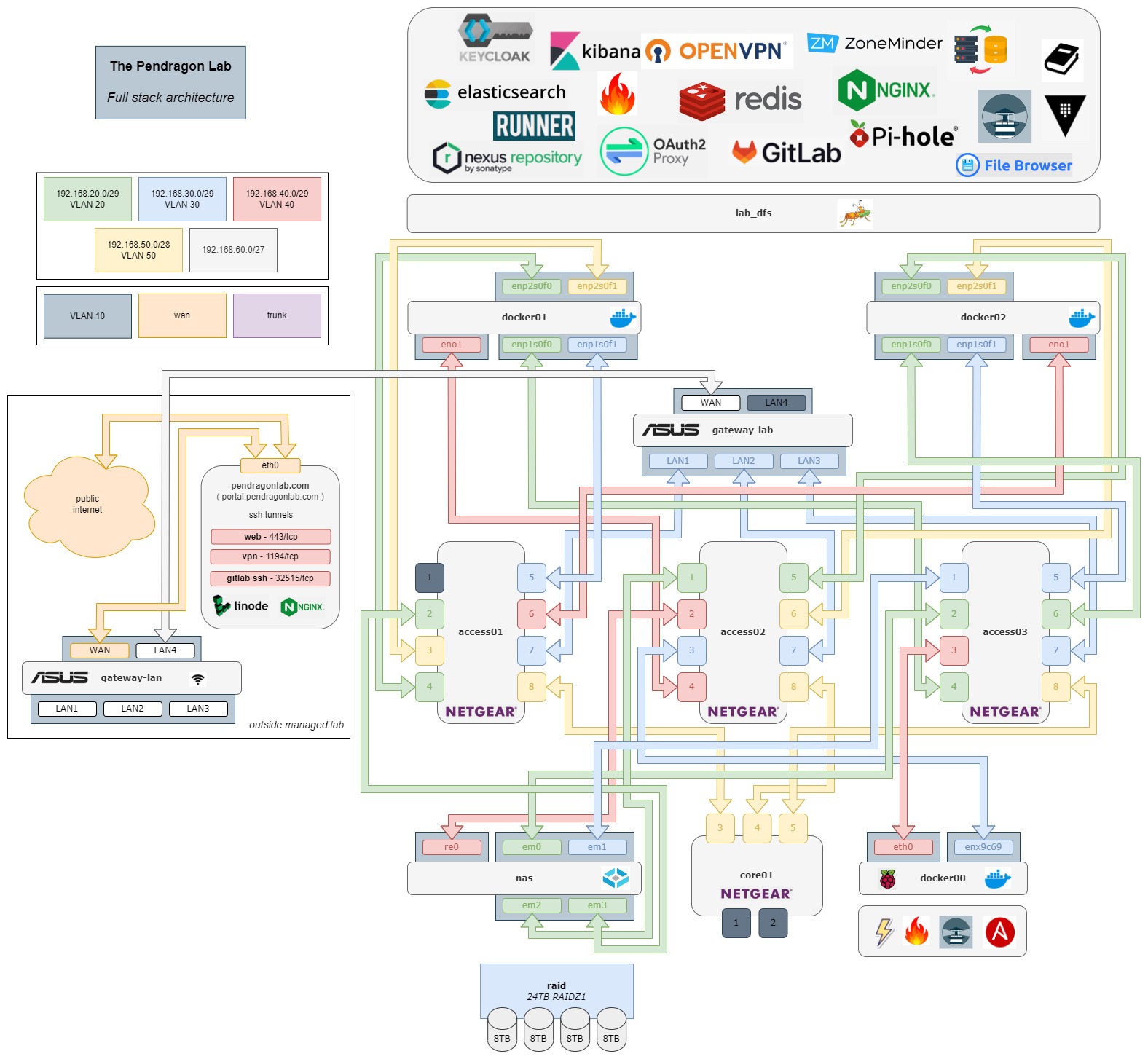
project goals
It's been said everyone in Information Technology has a homelab.
The trend is popular for many reasons though IT is an exceptionally broad category. Network engineers might build a homelab consisting of switches and routers where they're focused solely on layer 1-3 configuration. Application developers might not even have physical hardware, rather they use the term homelab to describe a GitHub space comprising personal code projects not restricted to corporate NDA's. Popular among DevOps people are small, Raspberry-Pi based Kubernetes clusters, provisioned with a private IaC but where the application layer is largely missing - all the horsepower but with nowhere to go.
Whatever your job title, the full stack has something to teach everyone and only stands to improve your quality as an engineer. This project attempts to address the entire gamut of Information Technology organized around these core principals :
-
keep it simple
If you've ever managed large projects before, you've learned, most likely through fire, that cutting out the noise is the best way to not accrue tech debt parallel to how your project scales. Never do with 10 lines what can be done in 5 which is usually an ability that comes after a messy, initial Proof of Concept. Go back, refactor, make it simpler and yes, at the expense of the velocity to deploy new features. The fact that it works is not in itself an accomplishment. Now make it work all the time and with 10x the use cases.
-
keep it cheap
The GNU license has enabled a flourishing FOSS ( Free and Open Source Software ) community. Truth is, there are very few software products used in everyday enterprise solutions that aren't free to install. Besides the obvious power consumption costs, this project proudly boasts a total reccurring expense of around 5 dollars a month. That's just what it costs to hold a tiny Linode instance deployed in the cloud. Everything else is run on-site and using 100% free software. In addition, each of the lab projects have an attached GNU license making the local code completely free for download and modification.
-
maximize resource usage
There is no argument for spending more money on more hardware until the maximum resource capabilities of the existing hosts have been met. Realtime metrics are analyzed in deciding when and how new hardware is ever added. Suffice it to say and now with the experience to prove it, you can run a comprehensive stack of today's enterprise concepts on two i7 PCs, 128GB's of combined RAM and a shared NAS with reasonable high availability. Your 24U, 10-node super cluster impresses you and your Amazon purchase history.
-
layers 1-7
As stated earlier, this project touches on each layer starting with the in-house applications which utilize the locally-developed tooling running on the custom-designed hardware - from plugging in the network cable all the way to the log output of your own application and using sophisticated CICD, tooling and monitoring. In the real world, this would usually be accomplished across a fleet of different teams, often working in silos from one another where the culture of that's not my job persists. If your module's function returned an error because the cable wasn't plugged into the right VLAN port, here it's your job to fix it.
-
security
In software development, the difference between a simple module and a fully-loaded one is often determined in the quality of its security; certainly is the case for popular IaC vendors like Terraform. Quietly and without warning, the term DevOps has been retired over the years in favor of the more specific DevSecOps, especially in government and military sectors. This lab possesses a unique solution for hardening security as its intended audience is and will always be the public internet which on a good day can be like the Wild West and on bad days, like Ragnarök.
With that being said, welcome once more to my little project. Feel free to explore all the pages within this docs portal for a better comprehension. Access to the lab is mostly self-service. Just follow the steps outlined in the User Onboarding section to get started.
web services
There are a number of proxied web services securely provided by this lab.
Those which redirect to oauth2-proxy for Keycloak MFA are appended with *. Note most ingresses are geofenced, either by country or local region; anyone outside these locations will be redirected to a static 403 Forbidden page.
See Web Ingress Matrix for a table on the reverse proxy configuration.
Publicly Available
This Docs Server- Redundant, yes, but diligent.-
External Proxy Ping- Confirm external web proxy connectivity. -
Static Webpage
Title Page- Introductory landing page which redirects from the root domain.My Professional Résumé- Shameless plug into how I got to be the way I am :/
Only Available In The United States
Secrets Vault- Encrypted lab secrets store.*GitLab CI/CD- All lab code projects are organized under the groupelise.*Keycloak User Console- Manage Keycloak SSO user settings.*Nexus Console- Artifact Repository for locally-hosted Docker images as well as proxying both Docker Hub and APT packages.*Pihole DNS- Trusted Ad blocker, doubling as a LAN-wide DNS server.*OpenVPN Access Server- Securely access isolated networks within the LAN.*Elasticsearch API- Endpoint for Elasticsearch API.*Kibana Monitoring- All-in-one log parsing, systems monitoring and alerting solution for Elastic stack.*-
RAID Volume File Browser- Web-based file manager for the NAS RAID volume.* -
Docker Registries
Nexus Hosted Docker Registry- Repository for locally-created Docker images.Nexus Proxy Docker Registry- Repository for proxying DockerHub images.
-
SSO session endpoints
Oauth2-Proxy Session Info- Display user info for logged in SSO session.Oauth2-Proxy Sign Out- Sign out SSO session in Keycloak and delete session token from redis store.
Only Available In The Regional Area
TrueNAS Console- NAS device which provides RAIDZ1 storage for the NAS RAID volume.*Lab Gateway Configuration- Configure gateway for lab gateway network.*LAN Gateway Configuration- Configure gateway for guest LAN network*ZoneMinder Device Montage- Home surveillance system including motion-detected alerting.*
Only Available Within LAN Networks
Nginx Metrics- Used in polling Internal Nginx metrics to Elasticsearch.Internal Proxy Ping- Confirm internal web proxy connectivity.