Networking
architecture
The physical network is segmented into five tagged VLANs. The lab switches are all layer 2 and are organized into a tier 2 architecture with a core layer switch prefixed with core and the access layer switches, with access.
Switch Port Assignments and 802.1q configuration
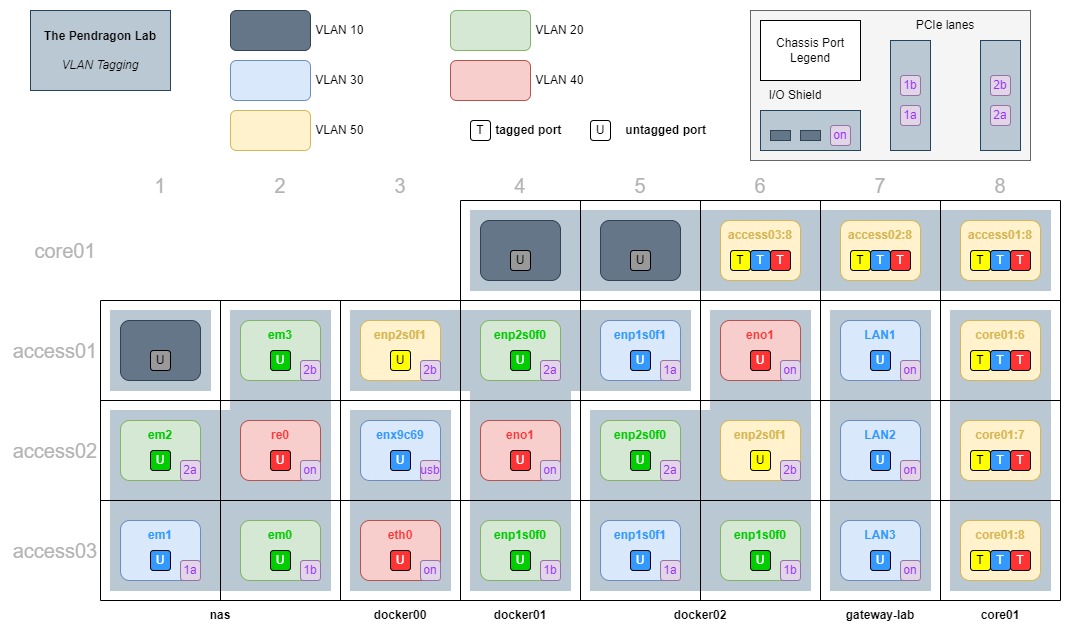
VLAN access ports are distributed more or less evenly across the access layer to provide redundancy against failing switches.
subnets
NOTE : For DNS assignments and the full host inventory, see the Inventory doc.
| VLAN | Network ID / CIDR | Subnet Mask | Description |
|---|---|---|---|
| 10 | Where wandering eth jacks fall into the void | ||
| 20 | 192.168.20.0/29 |
255.255.255.248 |
DFS and RAID volume CIFS storage |
| 30 | 192.168.30.0/29 |
255.255.255.248 |
Gateway routing |
| 40 | 192.168.40.0/29 |
255.255.255.248 |
Services and host management |
| 50 | 192.168.50.0/28 |
255.255.255.240 |
Switch management |
192.168.60.0/27 |
255.255.255.224 |
LAN guest | |
192.168.70.0/29 |
255.255.255.248 |
VPN client network, bridged |
VLAN 10 - Any unpopulated switch ports are assigned to VLAN 10 which is an isolated, non-trunked, non-routable VLAN. This is intentionally meant as a dead zone or jailed VLAN for empty switch ports so anything plugging into them can't go anywhere within the environment.
VLAN 30 - gateway-lab has an ethernet connection into each access switch which provides redundancy for the lab router. In order to prevent switch loops, VLAN 30 is not configured with a trunk. It doesn't need one as it is solely intended as a gateway-accessing subnet and every access switch already has a direct switch connection to gateway-lab.
192.168.60.0/27 - Refers to the LAN network and is managed outside this lab and as such, has no VLAN. The only requirement is that it have an internet-routed gateway, typically provided by the Internet Service Provider ( ISP ). The WAN port on gateway-lab simply plugs into the LAN network as a means of routing the lab to the internet without exposing the lab.
192.168.70.0/29 - The virtual network for the openvpnas instance which grants remote access to the physical networks. Each VPN profile is restricted to a specific subnet / VLAN.