Lazarus
power outage
This lab possesses a unique solution for managing fluctuations in power supply.
A hard reality of running an at-home server farm is that residential power can often be unpredictable. Outages are a fact of life and often energy customers are left with a single option: wait until the power is restored.
These outages crash core services that have the potential of data corruption and then can't recover after the power has been restored, remaining offline until the administrator can be back onsite to redeploy.
This lab does make use of UPS battery backups which help to secure the hardware during these outages but the batteries typically don't last longer than 30-40 minutes whereas typical outages can last several hours.
To address this, Lazarus is the codename for the project developed which automates the spinning down and spinning back up of lab infrastructure during moments of power instability by constantly assessing the metric data fed in from the UPS'. These power cycles can also be scheduled on a frequency such as daily, weekly, or monthly or maybe just a single manual job the user might want to execute once.
As Lazarus manages these cycles, it is constantly streaming the UPS metrics to Elastic stack for easy visualization.
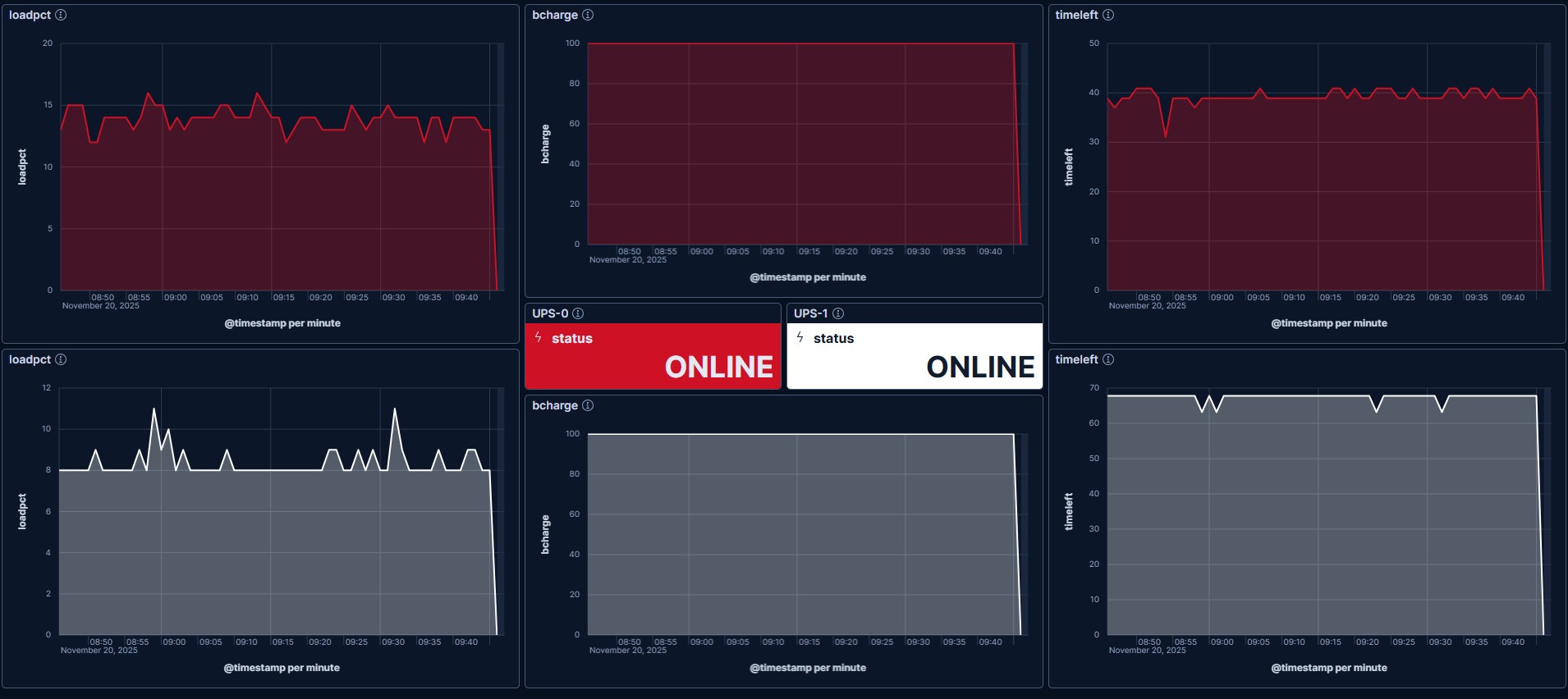
APC UPS dashboard in Elastic, displaying the UPS metrics used in Lazarus.
anatomy
Lazarus works by requesting what are called power cycle jobs.
The power cycle job is just a run of the host-mgmt stack which can be executed in one of two modes: either it runs as a down cycle which runs the Ansible stack in reverse, shutting down services and containers and finally powering off the machines. When it runs in up cycle, the PCs are booted, the backend services are started and the rest of the bootstrap steps are run until the lab is fully loaded.
Together, both modes enable the administrator the ability to power cycle the full lab.
Users submit these power cycle requests via the Lazarus pipelines, filling in the appropriate fields. When the job executes, it submits the data into CSV format to the Lazarus container running in the lab.
These power cycle jobs are given a time to execute which are managed depending on the job's type. As these values are defined, they are persisted to a jobs.json file within the Lazarus app data folders. The Lazarus service is constantly looking for objects in this file and execute their mode's when the appropriate time has lapsed which is defined in the element, trigger.
{
  "jobs": [
    {
      "id": "KykTLFuCQpbGJVrysgvbxnxbmQewcJvfuKophaHh",
      "type": "schedule:daily",
      "mode": "down",
      "trigger": {
        "date": "2025-11-21",
        "time": "01:00:00"
      }
    },
    {
      "id": "yBuqAOInuAbsnXpaTWbqEvDJRKzIcMNlavVzOqaB",
      "type": "schedule:daily",
      "mode": "up",
      "trigger": {
        "date": "2025-11-21",
        "time": "06:40:00"
      }
    }
  ]
}
Example power cycle jobs of type
schedule:daily.
pipeline execution
This table describes the various values taken into the pipeline which trigger the creation of the jobs into jobs.json.
Pipeline Variables
| CI Variable | jobs object attribute | Acceptable Values |
|---|---|---|
ELISE_PIPELINE_JOB_TYPE |
type |
schedule:<interval>, manual, power |
ELISE_PIPELINE_JOB_MODE |
mode |
up, down |
ELISE_PIPELINE_JOB_TRIGGER_DATE |
trigger.date |
YYYY-MM-DD |
ELISE_PIPELINE_JOB_TRIGGER_TIME |
trigger.time |
HH:mm:ss |
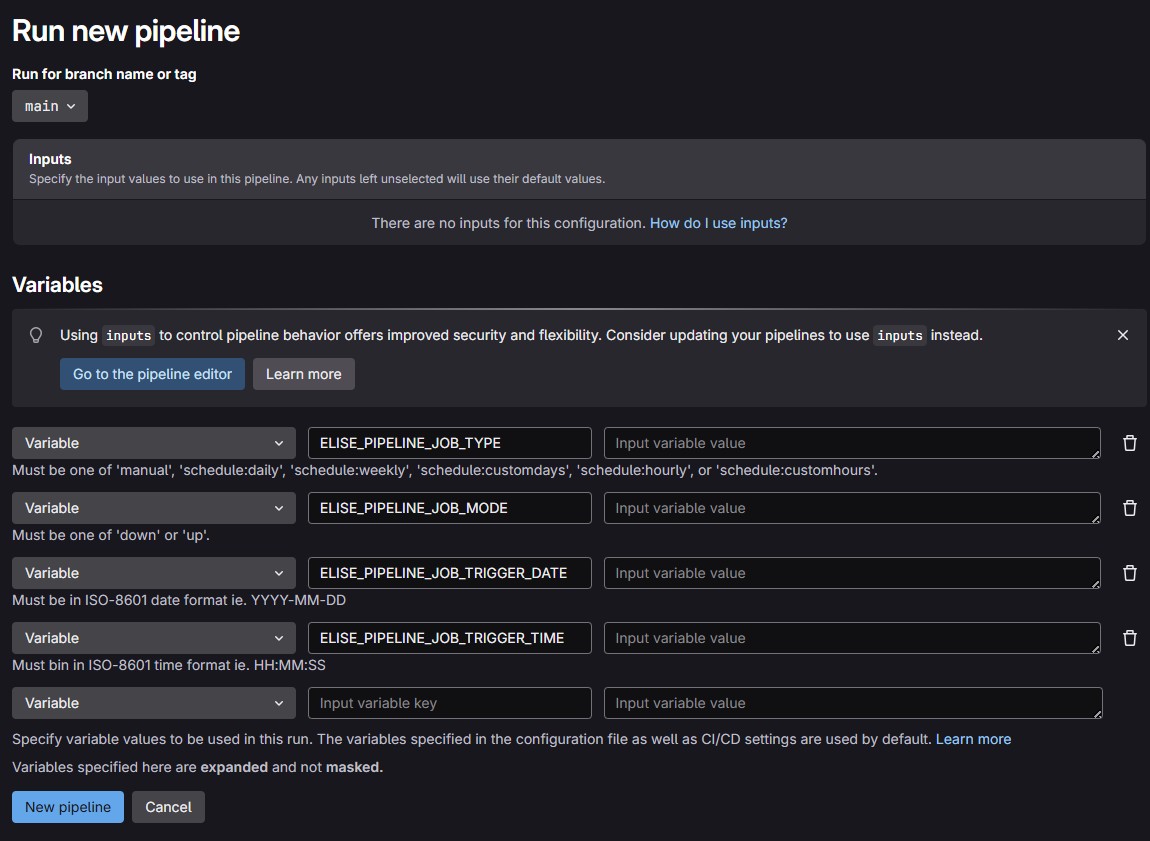
Pipelines page showing variable description.
NOTE :
scheduled:prefixed types will execute the job and then create a new job which is incremented by the value provided after the colon. In this way, it is reocurring.
Job Types
| Type | Description |
|---|---|
schedule:hourly |
Create same job where timestamp is set to execute 1 hour from the last job |
schedule:daily |
Create same job where timestamp is set to execute 1 day from the last job |
schedule:weekly |
Create same job where timestamp is set to execute 1 week from the last job |
schedule:customhours |
Create same job where timestamp is set to execute n hours from the last job |
schedule:customdays |
Create same job where timestamp is set to execute n days from the last job |
manual |
Create a one-time power cycle job |
power |
non-user initiated job which is created when power events are detected |
power events
So what constitutes as a power event?
There are criteria that when met by the UPS metrics create power type jobs. These jobs are initially down cycles which seek to have the lab powered off before the UPS battery's fully drain. That part's important.
Moreover, the Lazarus service runs on the Raspberry Pi Docker host, docker00.
RPI has a special advantage here in that once power is restored, it automatically boots the Operating System which automatically boots Lazarus as well. Now the container can start to assess criteria in creating the up cycle job which will bring the lab back up, only once it's convinced the power event has passed.
These values are defined in the project's lazarus.yml file. When UPS status' change and are consistent within these intervals, this qualifies as a power event.
| Constant | Description | Default Value |
|---|---|---|
POWER_TRIGGER_STATUS_INTERVAL |
Max seconds tolderated where status == ONBATT |
240 |
POWER_TRIGGER_EVENT_INTERVAL |
Seconds that a trigger event may occur within | 300 |
POWER_CLEAR_STATUS_INTERVAL |
Max seconds tolderated where status == ONLINE |
480 |
POWER_CLEAR_EVENT_INTERVAL |
Seconds that a clear event may occur within | 600 |